Everything your team needs.
Nothing it doesn't.
Internal comments, assignments, shared drafts and rules, sitting on top of the Gmail your team already uses. Everything the inbox needs is on every plan, starting at $6 a user.

Our most expensive plan costs less than their average entry plan.
The five shared inboxes we compare against average $22 a seat just to get started, mostly billed annually, several of them capping seats or rules until you move up a tier. ShareMail runs $6 to $19 with the whole inbox on every plan, monthly if you like, seats reducible any time, and a three-person team pays the same per seat as a three-hundred-person one.
ShareMail, the whole inbox on every plan
The alternatives, entry plan to top†
† Averages of published per-seat list pricing at Front, Hiver, Gmelius, Missive and Help Scout, read September 2026, taking each vendor's cheapest plan that actually includes a shared inbox and its highest published plan. Every number is broken out on the comparison pages.
Five things a shared inbox has to get right
All of it is on every plan. The only thing we hold back is breaking the analytics down by teammate, which is a management report rather than part of running the inbox.
Talk about the email, inside the email
Internal comments live in the conversation's own timeline. No forwarding, no CC chain, no separate chat tool holding half the context. @mention a teammate and they're subscribed, notified, and looking at exactly what you're looking at.
Comments are invisible to the customer and impossible to send by accident: the comment box is a different box from the reply box, and it says whose inbox can see it.

Search that includes what your team said
One query spans customer messages and your internal discussion.
The half-remembered "someone explained this in a note months ago" is one
search away, with Gmail-style operators like from:,
tag:, is:open and in:comments.
Both results below matched on words that appear nowhere in the customer's email, only in a teammate's comment.

One owner, and drafts that can't collide
Assign a conversation and it's unambiguous who has it. Everyone else sees the owner, the unassigned queue empties as work gets picked up, and round-robin rules can hand things out automatically while skipping whoever is marked busy.
Drafts are shared and locked to their assignee, so two people can never quietly overwrite each other's reply. Teammates watch it take shape read-only instead.

Automation you can read in one line
Rules are WHEN a message arrives → IF it matches → THEN do this. Tag it, assign it, round-robin it, notify someone. You can read a rule out loud and know what it does, which is not true of most workflow builders.
Unlimited rules on every plan, including the $6 one.

Know who is actually carrying the queue
Most dashboards in this category count clicks, which mostly measures who types the most. Ours counts the work: conversations handled, replies sent, median first response time, and what each person still has open right now. The oldest thing anyone is sitting on is called out, because that is the number a customer is feeling.
The inbox-wide numbers are on every plan. Breaking them down by teammate, which is what the view below shows, is the Business plan.
Personal inboxes never appear either way. The owner's view covers shared queues only, so connecting your own Gmail to ShareMail does not hand your boss a log of your mail.

It can look like Gmail, or it can look like Front
Most shared inboxes pick a shape and make you live in it. Pick yours when you sign up and change it whenever: it is a per-person setting, so two people on the same team can each have the one their hands already know.


An Android app Beta
The shared queue, your assigned work and your own inbox, with the same badges as the web sidebar. Read a thread, talk to your team in internal comments, reply, snooze, star, tag and search, and get a push when something lands on you.
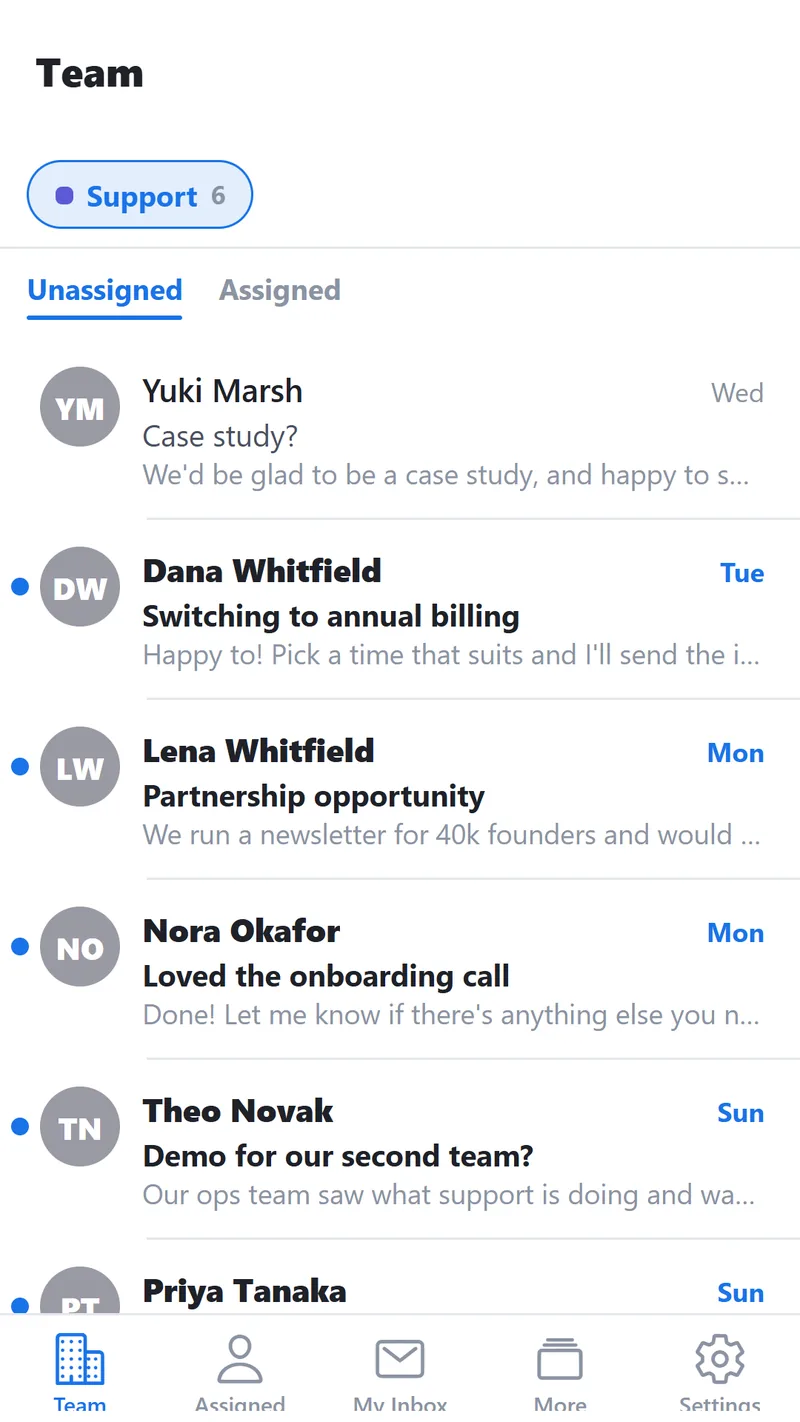
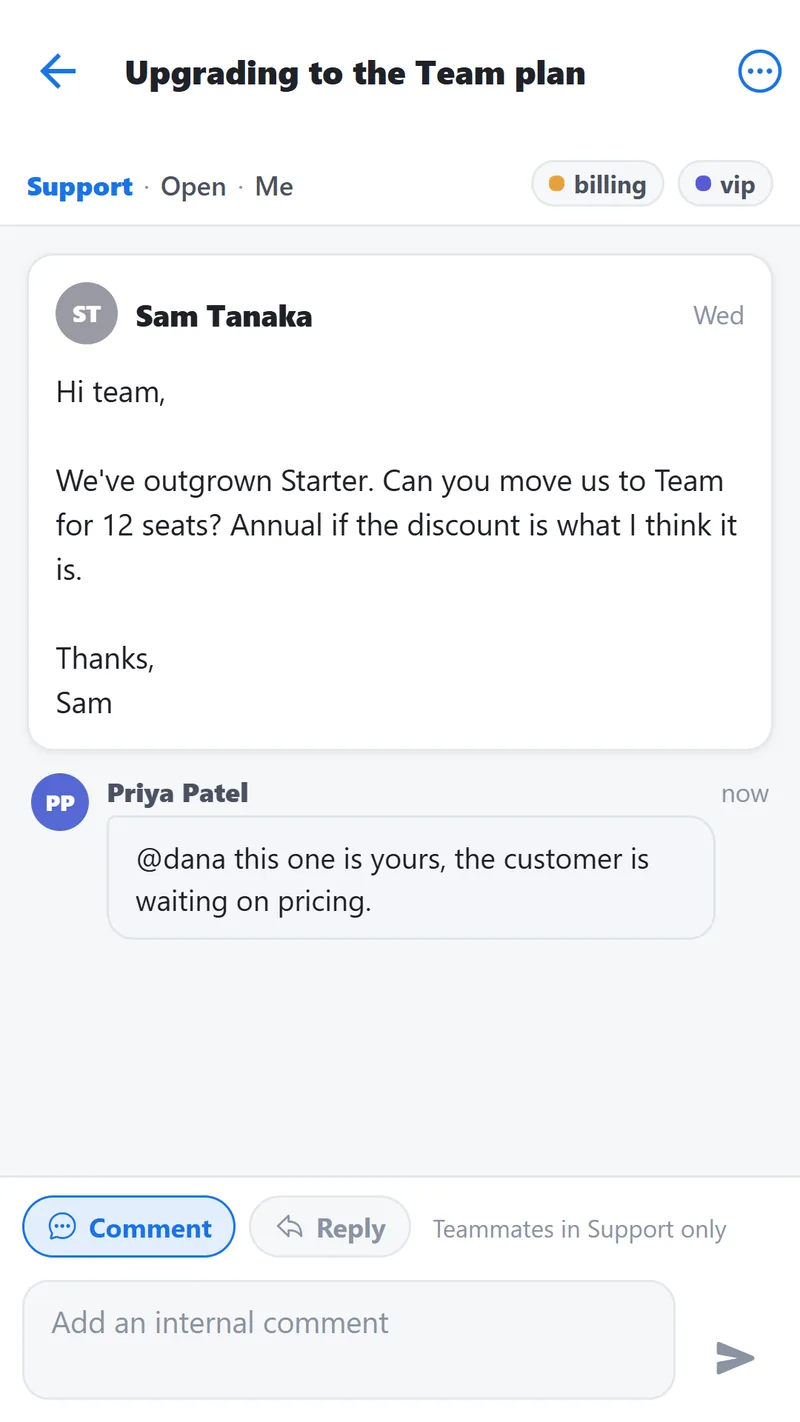
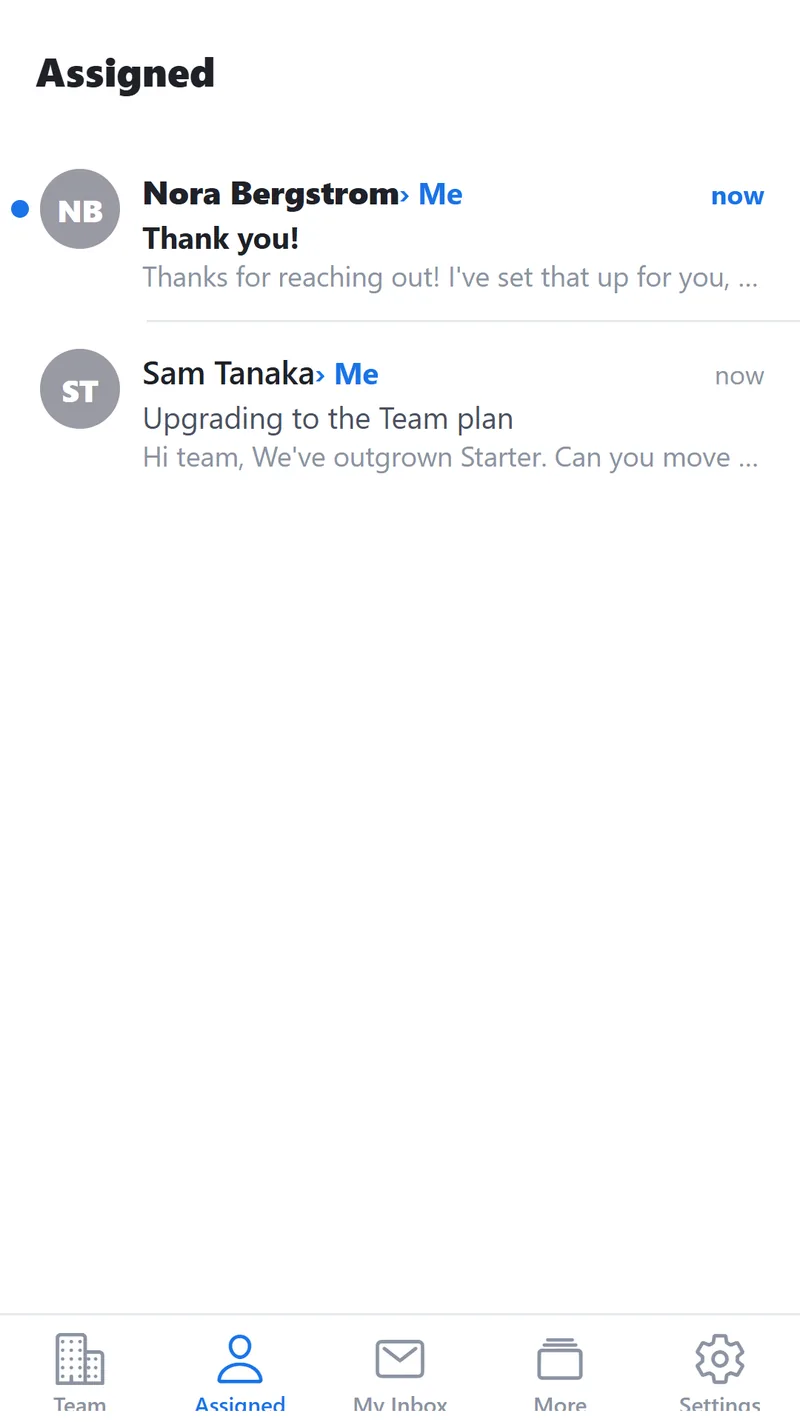
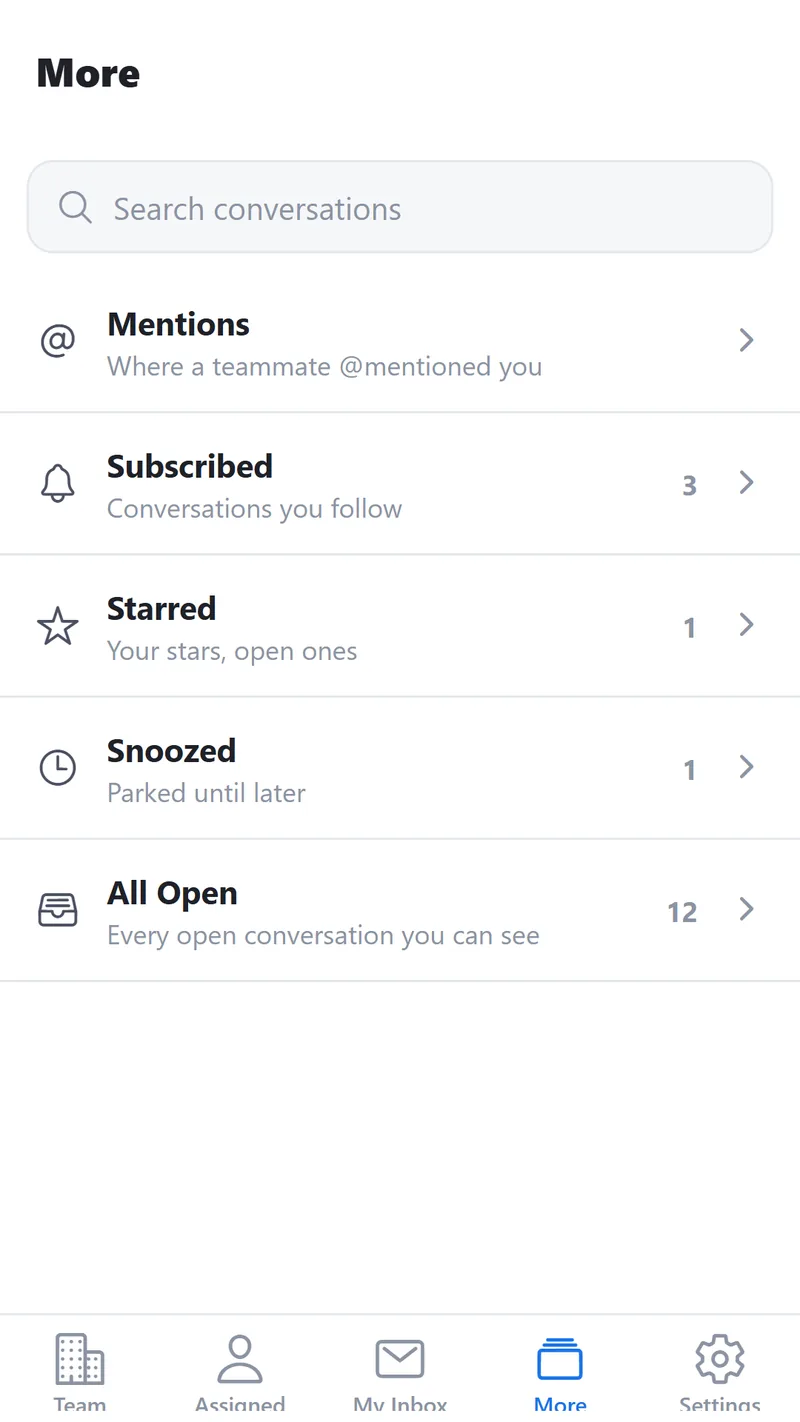
In testing through Google Play, not yet on the public store, and Android only for now. You pair a phone with a short code from Settings, so your Google password never touches it. Ask for a test invite if you want it early.
Bolt-ons, not a bundle
Anything beyond the shared inbox is a separate thing you switch on. Off by default, priced on its own, and never a reason to move you up a tier. The teams that want it get it, and the teams that don't never pay for it.
AI assist Coming
We're building it, and it will be yours to turn on: enabled per inbox, and each teammate decides whether they use it. Click once on a conversation and a suggested reply lands in the composer for you to edit and send. It never sends on its own, and it never runs on a thread you didn't ask about.
Whatever comes next
The same rule applies to everything after it. If a capability isn't part of running a shared inbox, it ships as a bolt-on with its own switch and its own price, so the core stays small and your bill only grows when you decide it should.
Features named in the present tense on this site are shipped and running today. Anything not shipped is labelled, like the one above.
Simple on the surface. Boring underneath, on purpose.
Gmail stays in charge of delivery
ShareMail never inserts itself into MX records or mail relays. Sending goes through the Gmail API from your own address; receiving lands in Gmail first. If every ShareMail server caught fire, your email would keep flowing.
True two-way sync
Archive, trash, spam, reopen: every action mirrors back to Gmail through a retried queue, and inbound changes flow the other way. Teammates who live in Gmail see exactly the same state you do.
Leaving costs you nothing
Your mailbox never left Gmail, so cancelling means disconnecting, not ransoming years of email out of someone else's store. Comments, tags, and assignments come with you as a full export.
We built it for a two-person team. Ours.
ShareMail started as an internal tool. Two of us were answering the same support address, tripping over each other, and every product we looked at wanted $25 to $65 a seat for a platform we'd use a fraction of. So we built the fraction, and priced it for teams our size.
We believe you shouldn't have to fund someone else's roadmap just to stop two people replying to the same email.
What you're not paying for
- A platform you'll never open. No workflow engine, no analytics suite, no knowledge base. If a small team wouldn't use it most weeks, it isn't in the price.
- AI you haven't turned on. AI is coming, and it will be optional: per inbox, with each person deciding for themselves. It won't arrive preinstalled, and it won't be folded into everyone's seat.
- A ticketing system in disguise. Your customers write emails. They shouldn't get an auto-reply with a case number and a satisfaction survey.
- A feature ladder. Rules, search, shared drafts and attachment limits are identical on every plan. Nothing you need to answer email is held back to make the next tier look better.
- A place your mail has to live. We never take over delivery and never become the store of record. Gmail keeps both jobs.
We're almost ready.
ShareMail has run our own support inbox every day since we built it. We're polishing onboarding before opening it up to other small teams.